
💧 Your Laptop Doesn’t Need a Swimming Pool to Get Damaged!
How water, food crumbs and moisture can quietly kill your laptop
We often think laptop damage happens because of a major accident—a glass of water being spilled directly over the keyboard or a laptop being dropped.
But sometimes, the damage happens slowly and silently.
A little moisture.
A few food crumbs.
A humid environment.
A contaminated USB port.
Over time, these can lead to corrosion, rust, short circuits and eventually a completely dead laptop.
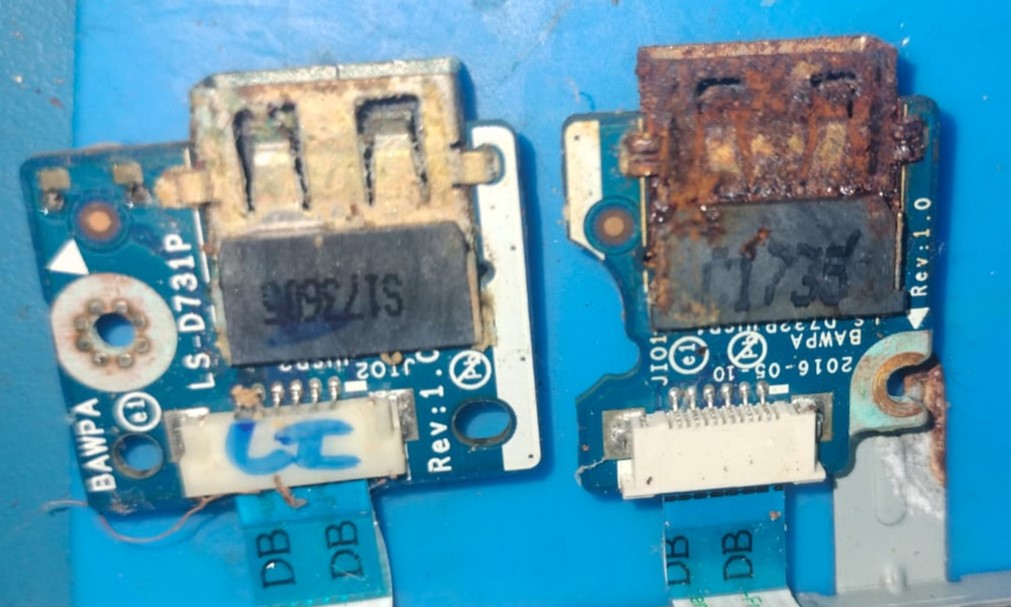
🔧 A real repair case
A customer recently brought in a laptop that was completely dead.
When we opened it, we found severe corrosion and contamination around the USB/IO boards and connectors.
The laptop's poor physical condition showed how moisture and contamination can damage components that are hidden inside the machine.
What makes this dangerous is that corrosion doesn't always cause immediate failure.
A laptop may work normally today and suddenly stop working days or weeks later.
🍪 Food + Laptop = A Dangerous Combination
Eating while working may seem harmless, but tiny food particles can enter through:
- Keyboard gaps
- USB ports
- Ventilation openings
- Hinges and other openings
That biscuit crumb beside your laptop may be small—but the repair bill doesn't have to be! 😄
☕ Keep Drinks Away From Your Laptop
Tea, coffee, water, juice and soft drinks are among the biggest threats to electronics.
Even a small amount of liquid can travel inside the laptop and reach:
Keyboard → connectors → daughterboards → motherboard
And sugary drinks can be particularly troublesome because they leave sticky residues behind.
🚨 What Should You Do If You Spill Liquid?
This is where many people make the biggest mistake:
“Let me switch it on and check whether it still works.”
❌ Don't.
Instead:
1. Switch the laptop OFF immediately.
2. Disconnect the charger.
3. Disconnect/remove the battery if it can be done safely.
4. Do not connect the charger again.
5. Do not repeatedly try to power it on.
6. Take it to a qualified technician as soon as possible.
The sooner the power is removed and the contamination is professionally inspected, the better the chance of preventing further damage.
🌧️ Humidity Can Also Be a Problem
You don't necessarily need a visible spill to have moisture-related problems.
Laptops used or stored in humid, damp environments can gradually develop oxidation and corrosion, especially around exposed connectors and ports.
So:
✅ Keep your laptop in a dry environment
✅ Use a proper laptop bag
✅ Keep ports clean and dry
✅ Avoid using it with wet hands
✅ Don't store a damp laptop inside a closed bag
🛡️ 5 Simple Rules to Protect Your Laptop
1. No drinks beside the laptop
Keep your tea, coffee and water at a safe distance.
2. Don't eat directly over it
Food particles can find their way into places you can't see.
3. Keep the ports dry
USB, charging and other ports are entry points for moisture and contamination.
4. Never ignore a spill
Even if the laptop appears to work normally, internal damage may have already started.
5. Act immediately after liquid exposure
Power OFF → disconnect power → professional inspection.
💡 Remember This
A laptop doesn't have to get soaked to suffer liquid damage.
Moisture + dust + food residue + time can create the perfect conditions for corrosion and electrical failure.
And once corrosion reaches the wrong component, a simple contamination issue can become an expensive motherboard repair.
❤️ Take care of your laptop today—before a small spill becomes a big repair.
K-Tech Computers – A Laptop Clinic
Reliable laptop & computer repair with honest diagnosis.
📍 Nagercoil
🔧 Laptop & Desktop Repair | Chip-Level Motherboard Repair | Data Recovery
🛡️ Repair with Bill & Warranty
📞 Contact us for professional inspection and repair.